Android XR Passthrough Camera State
Upon application startup, a device's passthrough camera may not be immediately available. Android XR Passthrough Camera State provides a method to let applications know the current state of the passthrough camera.
Project Settings
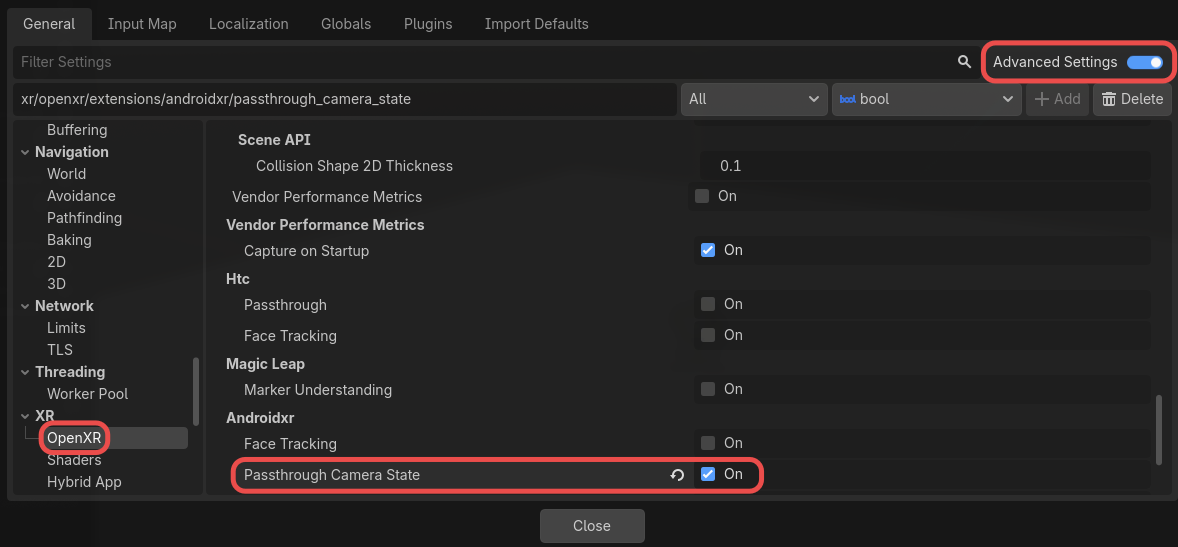
To use Passthrough Camera State, it must be enabled in project settings. The setting can be found in Project Settings under the OpenXR section. The Passthrough Camera State setting should be listed under Extensions in the Androidxr subcategory. Advanced Settings must be enabled for the setting to be visible.
Querying Passthrough Camera State
To check the passthrough camera state, retrieve the OpenXRAndroidPassthroughCameraStateExtension singleton and call get_passthrough_camera_state.
var passthrough_camera_state = Engine.get_singleton("OpenXRAndroidPassthroughCameraStateExtension")
if passthrough_camera_state:
    var camera_state = passthrough_camera_state.get_passthrough_camera_state()
This will return a PassthroughCameraState value indicating the state of the camera.