Android XR Environment Depth
The Android XR Environment Depth provides realtime depth information from the player's environment.
Project Settings
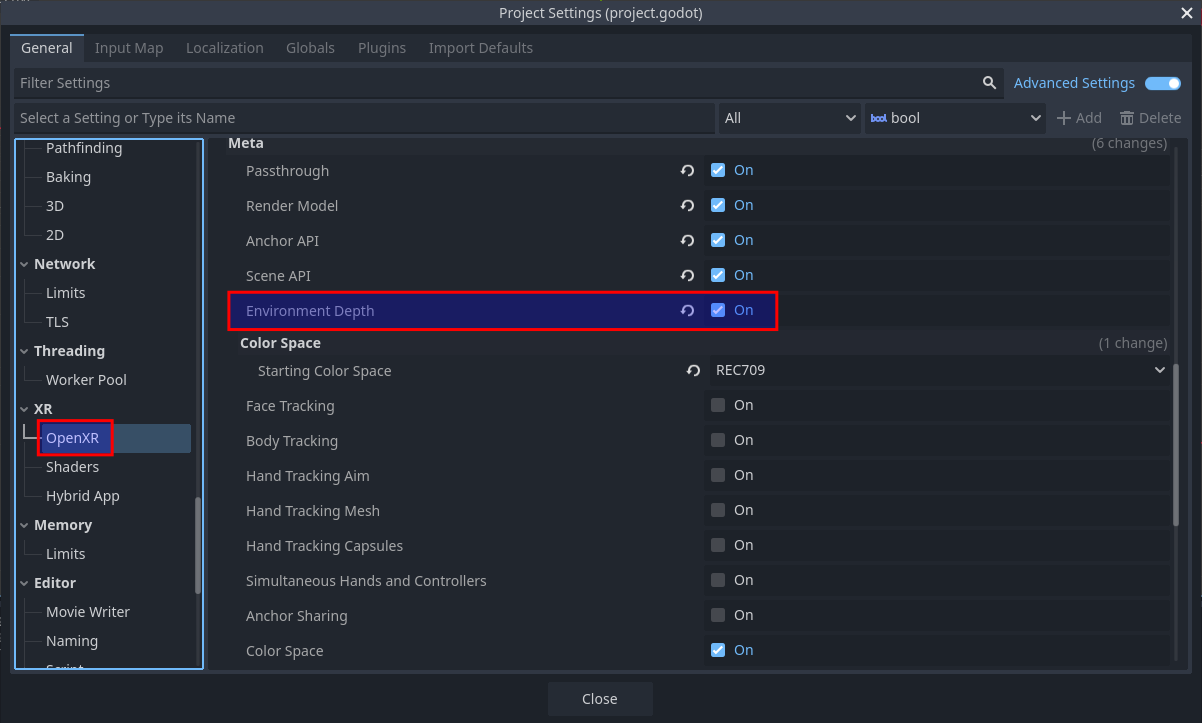
To use Android XR Environment Depth, the OpenXR extension must be enabled in project settings. The extension setting can be found in Project Settings under the OpenXR section. The Environment Depth setting should be listed under Extensions in the Androidxr subcategory.
Starting and stopping
Before Android XR Environment Depth can be used, it needs to be started:
if OpenXRAndroidEnvironmentDepthExtension.is_environment_depth_supported():
        OpenXRAndroidEnvironmentDepthExtension.start_environment_depth()
This will only work if there is an active OpenXR session. You can connect to the
OpenXRInterface.session_begun signal to run code right when the session starts.
There is a performance cost to using Android XR Environment Depth, so you should only start it when needed, and stop it when no longer needed. For example, if your application has both a VR and AR mode, you should make sure that Android XR Environment Depth is only running in AR mode.
if OpenXRAndroidEnvironmentDepthExtension.is_environment_depth_started():
        OpenXRAndroidEnvironmentDepthExtension.stop_environment_depth()
Smooth data
Data is provided in two varieties: raw (the default) and smooth.
The smooth data has been processed in order to:
Remove the user's hands, and
Smooth the depth transitions
To enable smooth data:
OpenXRAndroidEnvironmentDepthExtension.set_smooth(true)
When using smooth data, since the user's hands have been removed, it's common to also use virtual hand models animated by hand tracking.
Occlusion
Android XR Environment Depth is most commonly used to enable dynamic occlusion of virtual objects by real world objects in AR applications.
Normally, the images from the passthrough camera are drawn behind any virtual objects rendered by Godot. This means that if a real world object moves into a position that should be in front of a virtual object, the virtual object will still be drawn on top of the real world object. This can easily break immersion.
Using Android XR Environment Depth, you can prevent Godot from drawing pixels where a real world object would be closer than the given pixel.
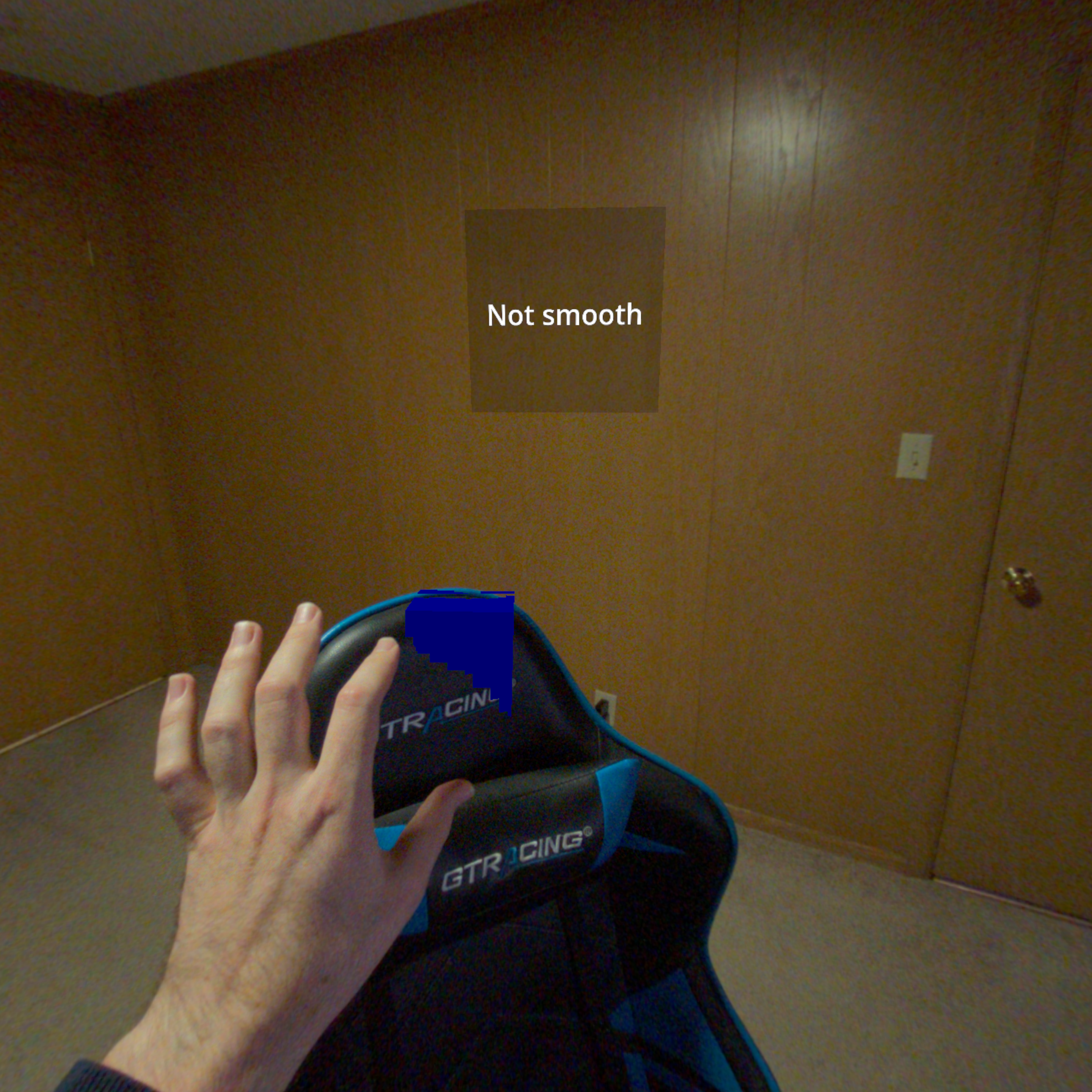
Example of a blue cube being occluded by a gaming chair.
Using the OpenXRAndroidEnvironmentDepth node
The easiest way to enable occlusion is by adding an OpenXRAndroidEnvironmentDepth node as a child of your XRCamera3D node.
This node takes the depth map from Android XR Environment Depth and reprojects it into the depth buffer used by Godot's renderer, so that any virtual pixels that are behind real-world objects will automatically be discard.
However, the depth map has a relatively low resolution, its accuracy decreases further away from the player, and some precision is lost in the reprojection.
To work around this issue, you can adjust the reprojection_offset_exponent and reprojection_offset_scale properties, which will offset the depth information to be somewhat closer the player. How much closer is a function of the distance from the camera.
You can think of the offset as being calculated by this formula:
var offset = pow(z_distance_from_camera, reprojection_offset_exponent) * reprojection_offset_scale
If you want certain objects to not be occluded, set the render_priority on their materials to a value lower than
OpenXRAndroidEnvironmentDepth.render_priority,
so that they're rendered before this node fills the depth buffer.
Note
All transparent objects are always rendered after all opaque objects, so there is no
render_priority value that can cause a transparent object to be rendered before this node.
If that isn't flexible enough for your needs, you can write your own shaders that directly use the environment depth data.
Using a custom shader
The environment depth map is directly available to Godot shaders, using the following global shader uniforms:
|
|
Will be |
|
|
The environment depth map texture captured by the depth sensor. |
|
|
The size of both dimensions of the depth map. |
|
|
The [code]tan()[/code] of the FOV angles of the depth sensor in this order: left, right, down, and up. |
|
|
The [code]tan()[/code] of the FOV angles of the depth sensor in this order: left, right, down, and up. |
|
|
Transform matrix from the NDC space of the depth sensor to world space, for the left eye. |
|
|
Transform matrix from the NDC space of the depth sensor to world space, for the right eye |
Using a custom shader will have slightly better precision than using OpenXRAndroidEnvironmentDepth,
because we aren't reprojecting into the coordinate space of Godot's camera.
It could also take advantage of ALPHA to smooth out the edges, rather than having a hard cutoff.