Physical Jump
Introduction
Physical Jump detection detects the players real-world jump and uses it to trigger a jump in the game.
Setup
The physical jump movement is implemented as a function scene that needs to be added as a child of the XROrigin3D. This will add a PlayerBody if necessary.
The setup should now look like this:
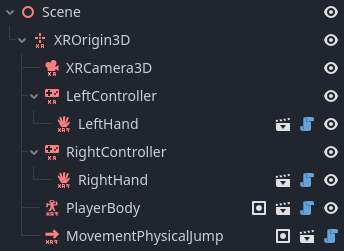
The functionality works out of the box but can be further configured:
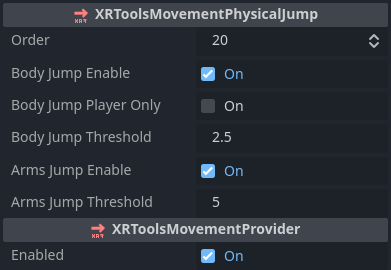
Configuration
XRToolsMovementPhysicalJump
| Property | Description |
|---|---|
| Enabled | When ticked the movement function is enabled |
| Order | The order in which this movement is applied when multiple movement functions are used |
| Body Jump Enable | Enables detection of the player physical jump |
| Body Jump Player Only | If enabled, the ground-physics settings are ignored and the player jumps as high as their real-world jump |
| Body Jump Threshold | Adjustment for physical jump detection (m/s²) |
| Arms Jump Enable | Enables detection of jump by swinging arms up |
| Arms Jump Threshold | Adjustment for arm jump detection (m/s²) |