Jump
Introduction
Jump movement allows the player to jump by pressing a button on the controller.
Setup
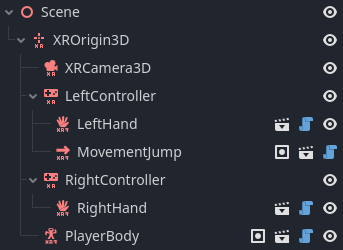
The jump movement is implemented as a function scene that needs to be added to the XRController3D whose input we are using. This will add a PlayerBody if necessary.
So if we want to implement the jump movement feature on the left hand
controller we need to add the scene to the left hand:
Jump velocity is set on the surface the player is standing on. This is achieved
by adding a ground physics node as a child of the physics body and setting the
ground physics properties:
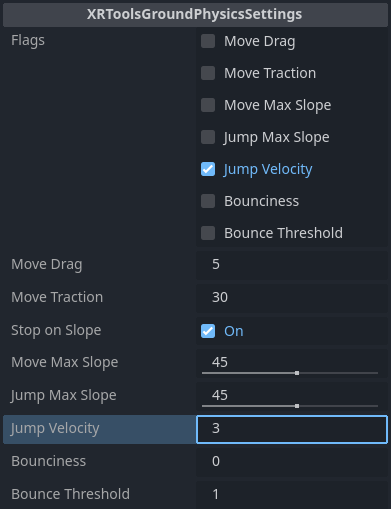
It is also possible to set default ground physics in the PlayerBody node.
Configuration
XRToolsMovementJump
| Property | Description |
|---|---|
| Enabled | When ticked the movement function is enabled |
| Order | The order in which this movement is applied when multiple movement functions are used |
| Jump Button Action | OpenXR Bool action to trigger jumping (usually ax_button when using the default action map) |
XRToolsGroundPhysicsSettings (for jump)
| Property | Description |
|---|---|
| Flags | Enable Jump Velocity to override with the Jump Velocity value |
| Jump Velocity | Velocity to apply to the player body when jumping |
Additional Resources
The following videos show the creation of a basic XR Player with hands and movement including jumping: