Grapple
Introduction
Grapple movement allows the player to fire a grappling line to an appropriate target, and to swing from the grappling line. This can achieve effects similar to notable and trade-marked superheroes.
Setup
The grapple movement is implemented as a function scene that needs to be added to the controller node whose input we are using. This will add a PlayerBody if necessary.
So if we want to implement the grapple movement feature on the right hand
controller we need to add the scene to the right hand:
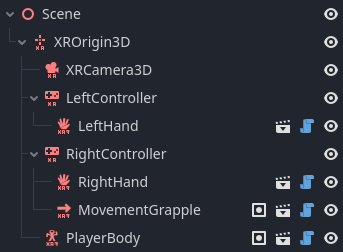
The functionality works out of the box but can be further configured:
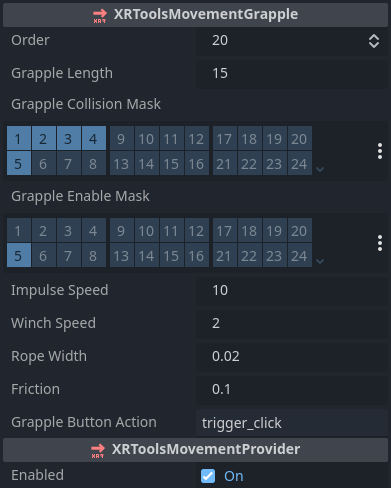
Configuration
XRToolsMovementGrapple
| Property | Description |
|---|---|
| Enabled | When ticked the movement function is enabled |
| Order | The order in which this movement is applied when multiple movement functions are used |
| Grapple Length | Maximum length to allow firing the grapple line |
| Grapple Collision Mask | Physics layers the grapple line collides with |
| Grapple Enable Mask | Physics layers the grapple line can hook on to |
| Impulse Speed | Initial impulse speed along the line when fired |
| Winch Speed | Speed at which the grapple line is winched in (pulling the player) |
| Rope Width | Visible width of the grapple line rope |
| Friction | Friction coefficient against the air while grappling (to slow swinging) |
| Grapple Button Action | OpenXR Bool action to trigger grappling (usually trigger_click when using the default action map) |
Additional Resources
The following videos show the creation of a basic XR Player with movement including grappling: